
Install and connect
TrustOrder for WooCommerce protects your shop from cash-on-delivery parcels that are never picked up. At checkout it hashes the buyer’s e-mail, phone number and address, and if the buyer has a history of refusing cash-on-delivery parcels, it hides cash on delivery. Raw personal data never leaves your shop. The one exception is the country and postcode of new orders: on by default and easy to turn off (see Settings).
TrustOrder is free. You need an API key from the upTools Console.
Requirements
Section titled “Requirements”- WordPress 6.6 or newer
- WooCommerce 8.2 or newer
- PHP 8.1 or newer
- Recommended: the PHP
intlextension. Without it (or withoutmbstring), values with non-ASCII characters, such as accented addresses or international e-mail domains, are not hashed, and an order whose e-mail contains such characters is not checked. The admin shows a notice when this happens.
TrustOrder works on both the block checkout and the classic (shortcode) checkout, with HPOS and with the legacy order storage.
Install the plugin
Section titled “Install the plugin”- Download the latest ZIP from the GitHub releases page.
- In WordPress, go to Plugins → Add New → Upload, choose the ZIP and install it. You can also upload the
trustorder-for-woofolder towp-content/plugins/. - Activate the plugin.
The admin screen is under WooCommerce → TrustOrder. Shop managers (anyone with the manage_woocommerce capability) can open it. It has five sections: Overview, Settings, Exceptions, Backfill and Help.
Get a free API key
Section titled “Get a free API key”Without a key nothing is checked and every payment method stays available. Until you add one, the Settings page shows the steps right on the API key card, with a Create a key in the Console button.
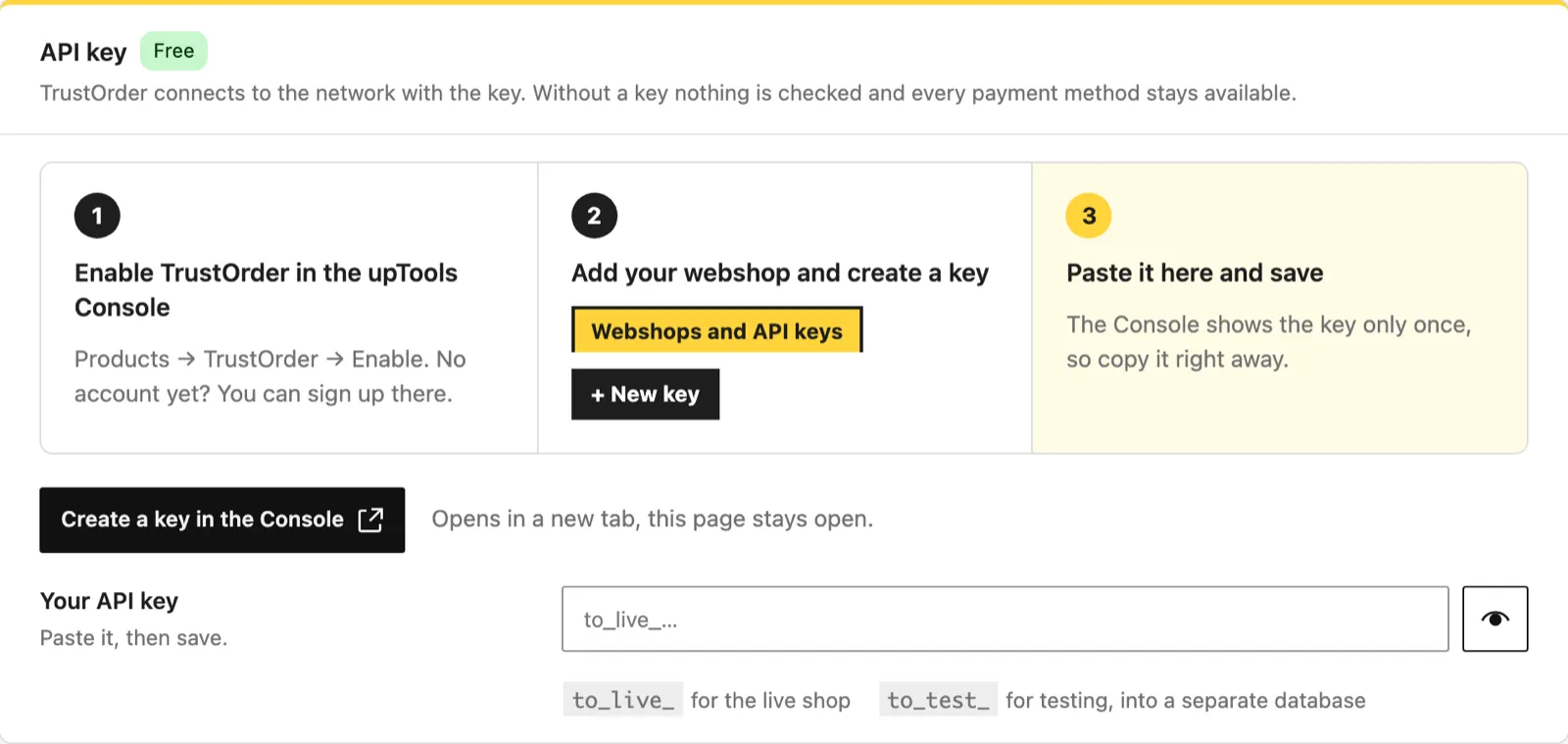
- Sign in to the upTools Console. No account yet? You can sign up there.
- Go to Products → TrustOrder → Enable.
- On the Webshops and API keys tab, add your webshop with Add a webshop.
- Create a key with New key.
- Copy the key right away. The Console shows the key only once.
Test key or live key
Section titled “Test key or live key”There are two kinds of keys:
to_live_...keys are for the live shop.to_test_...keys are for testing. Their data goes into a separate test database.
Test and live keys keep separate reports. If you switch from one key to the other, an order is sent again to the new environment. Switching keys does not withdraw reports already sent with the other key.
Add the key in Settings
Section titled “Add the key in Settings”- Go to WooCommerce → TrustOrder → Settings.
- Paste the key into Your API key.
- Click Save in the top bar.
The key is write-only: after saving, only its first 12 characters are shown. With a saved key, the card shows the key, its environment and the connection state, with Replace the key, Remove key and a Keys in the Console link.
If you remove the key, no buyer is checked and no order outcome is reported until you add a key again.
Or set the key in the configuration
Section titled “Or set the key in the configuration”You can set the key in wp-config.php instead:
define( 'TRUSTORDER_API_KEY', 'to_live_...' );On Bedrock, put the key in .env:
TRUSTORDER_API_KEY=to_live_...and add this line to config/application.php:
Config::define( 'TRUSTORDER_API_KEY', env( 'TRUSTORDER_API_KEY' ) );How the constant works:
- It overrides the saved key and is never written to the database.
- The API key card shows Key from the configuration with only the first 12 characters of the key.
- While the constant is defined, the key cannot be changed from the admin screen, the REST API or WP-CLI.
- An invalid value counts as no key.
- An empty or null value (for example Bedrock’s
env()of a missing variable) counts as not set, and the saved key stays in use.
Check the connection
Section titled “Check the connection”Open WooCommerce → TrustOrder → Overview. The Connection card runs a connection test when you open the page. Click Test again to run it once more.
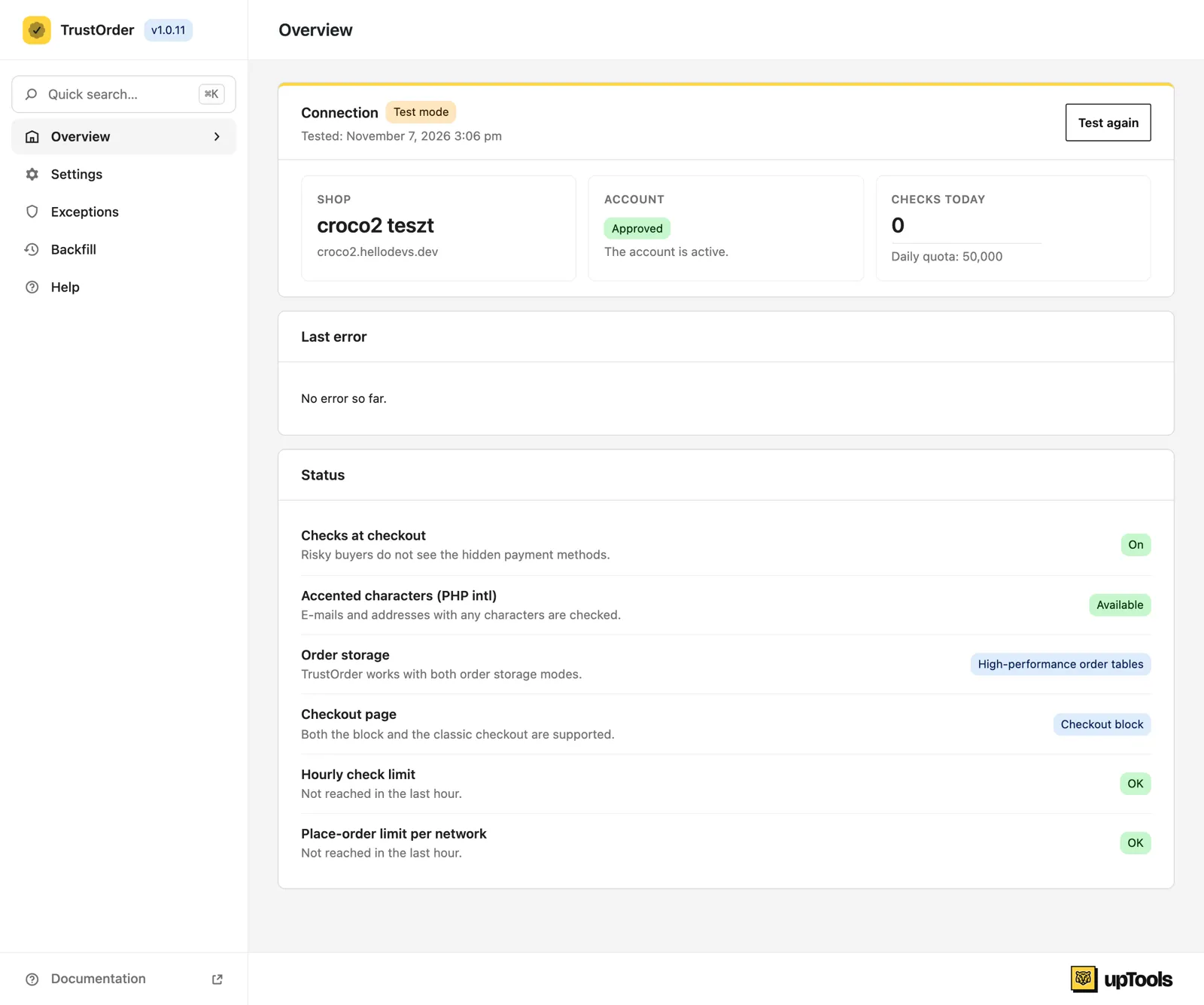
When the test succeeds, you see:
- Shop: the name of your webshop.
- Account: Approved, or Awaiting approval. While the account awaits approval, checks already work.
- Checks today, with your Daily quota.
A to_test_ key shows a Test mode badge, a live key shows Live.
If the test fails, the card shows the reason in plain words. See Troubleshooting.
Behind a proxy or load balancer
Section titled “Behind a proxy or load balancer”If your shop runs behind a proxy or load balancer, you may need to return the real visitor address from the trustorder_client_ip filter. See Troubleshooting.
For developers
Section titled “For developers”The TrustOrder API is documented separately: TrustOrder API.