SMTP API Server
This document provides information about the SMTP API server, its configuration, and how to use it with various clients.
Overview
The SMTP API server acts as a bridge between SMTP clients and the Uptools Mail API. It accepts emails through standard SMTP protocols and forwards them to the Mail API for delivery. This allows you to use standard email clients and applications to send emails through the Uptools Mail API.
Features
- Supports both STARTTLS (port 587) and Implicit SSL/TLS (port 465)
- Authentication using API keys
- Compatible with standard email clients and applications
Connection Details
| Setting | Value |
|---|---|
| SMTP Host | smtp-mail.api.uptools.io |
| SMTP Ports | 587 (STARTTLS) or 465 (SSL/TLS) |
| Username | uptools |
| Password | Your API Key |
| Encryption | STARTTLS (port 587) or SSL/TLS (port 465) |
| Authentication | Required |
Configuring Email Clients
WordPress
To configure WordPress to use the SMTP API server:
- Install an SMTP plugin like "WP Mail SMTP" or "Post SMTP"
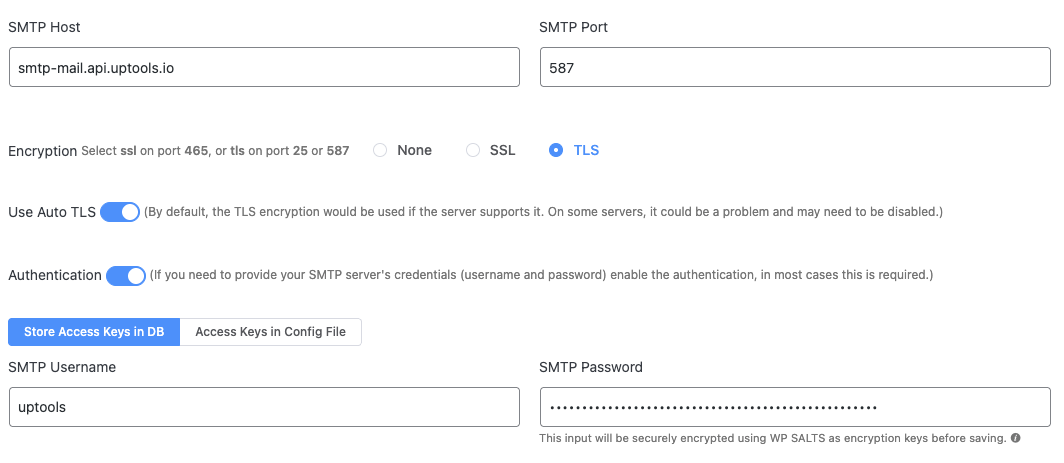
- Configure with these settings:
- SMTP Host:
smtp-mail.api.uptools.io - SMTP Port:
465 - Encryption:
SSL / TLS(Not STARTTLS) - Authentication:
Yes - SMTP Username:
uptools - SMTP Password: Your API Key (e.g.,
sk_473b83bfce924abcc771e1967407639fdfbd569b05e9ce92) - Auto TLS:
OFF(Optional: can work with either setting)
- SMTP Host:
Example FluentSMTP Configuration
https://docs.uptools.io
Thunderbird
- Go to Account Settings > Outgoing Server (SMTP)
- Add a new SMTP server with these settings:
- Description: Uptools SMTP
- Server Name: smtp-mail.api.uptools.io
- Port: 465
- Connection security: SSL/TLS
- Authentication method: Normal password
- User Name: uptools
- Password: Your API Key
Node.js (Nodemailer)
const nodemailer = require('nodemailer');

const transporter = nodemailer.createTransport({
  host: 'smtp-mail.api.uptools.io',
  port: 465,
  secure: true, // use SSL
  auth: {
    user: 'uptools',
    pass: 'YOUR_API_KEY'
  }
});

transporter.sendMail({
  from: '[email protected]',
  to: '[email protected]',
  subject: 'Test Email',
  text: 'This is a test email from Nodemailer',
  html: '<b>This is a test email from Nodemailer</b>'
});
Troubleshooting
Common Issues
"Could not connect to SMTP host"
- Verify your network connection
- Check if the SMTP host is typed correctly
- Ensure your firewall isn't blocking the connection
Authentication failures
- Verify you are using the correct username (
uptools) - Ensure your API key is valid and correctly entered
- Check that authentication is enabled in your SMTP client
API Integration
The SMTP server forwards emails to the Uptools Mail API using the following format:
{
  "to": ["[email protected]"],
  "subject": "Email Subject",
  "body": "<b>HTML email body</b>"
}
Headers are sent with:
- Content-Type: application/json
- Authorization: Bearer YOUR_API_KEY
Security Considerations
- The server uses TLS encryption to secure all communications
- API keys should be kept confidential
- The server validates client certificates for secure connections
- All emails are processed through the Uptools Mail API for delivery